
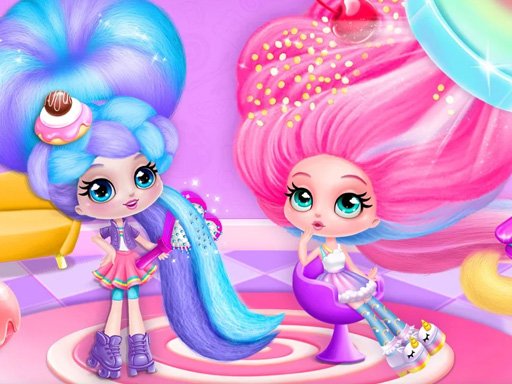
Cotton Candy Styling Salon
Reviews
Cotton Candy Styling Salon offers a relaxing, open-ended experience perfect for creative kids. The wide range of hair tools, bright colors, and fun accessories let you design unique looks. The salon decoration adds extra fun. Simple controls make it easy to play on any device.
About this game
Game Introduction
Welcome to Cotton Candy Styling Salon, a sweet dress up game where imagination takes the lead. Meet the Candylocks dolls, each with long, soft hair that looks just like cotton candy. You can curl, braid, straighten, or cut their hair any way you like. Dye each section in bright colors like pink, blue, or sparkly purple. Add fun DIY accessories such as candy bows and lollipop clips. Create cute makeup looks using blush, lipstick, and eyeshadow. Then decorate your salon with chairs, mirrors, and candy jars. There are no rules, just pure creative fun.
How to Play
Use your mouse or touch screen to pick up styling tools like curling irons, brushes, and scissors. Click and drag to style the doll's hair. Choose from a rainbow of colors to dye each section. Add accessories by dragging them onto the hair. Use the makeup palette to apply cute looks to the doll's face. Finally, decorate the salon by placing items like chairs, mirrors, and candy jars. The game is simple and open-ended, letting you explore freely.
Game Features
Creative hair styling with multiple tools. A wide rainbow of hair dye colors. DIY hair accessories like candy bows and lollipop clips. Makeup options including blush, lipstick, and eyeshadow. Salon decoration with furniture and decor items. No time limits or scores, just pure creativity.
Tips for Success
Experiment with different tool combinations to discover unique hairstyles. Try layering colors for a vibrant look. Mix and match accessories for a personalized style. Decorate your salon to reflect your taste. There is no right or wrong way to play, so let your creativity flow.




Comments
Sign in to leave a review
No account? Create one
No comments yet.